
Secure Docker Images & Container Scanning
Enthusiastic about DevOps tools like Docker, Kubernetes, Maven, Nagios, Chef, and Ansible and currently learning and gaining experience by doing some hands-on projects on these tools. Also, started learning about AWS and GCP (Cloud Computing Platforms).
Containers transformed software delivery by making applications portable, lightweight, and consistent across environments. But every Docker image carries more than application code—it also carries an operating system, libraries, dependencies, configuration files, and sometimes hidden security risks.
A secure deployment doesn't begin when a container starts. It begins the moment a Docker image is created.
Modern DevSecOps practices treat container images as software artifacts that must be secured throughout their lifecycle. Vulnerability scanning, secure image design, minimal attack surfaces, trusted base images, and continuous monitoring have become essential parts of container security.
Table of Contents
Understanding Docker Images
Why Container Security Matters
The Anatomy of a Docker Image
What Makes an Image Vulnerable?
Types of Container Vulnerabilities
Container Supply Chain Security
Understanding CVEs and Security Scores
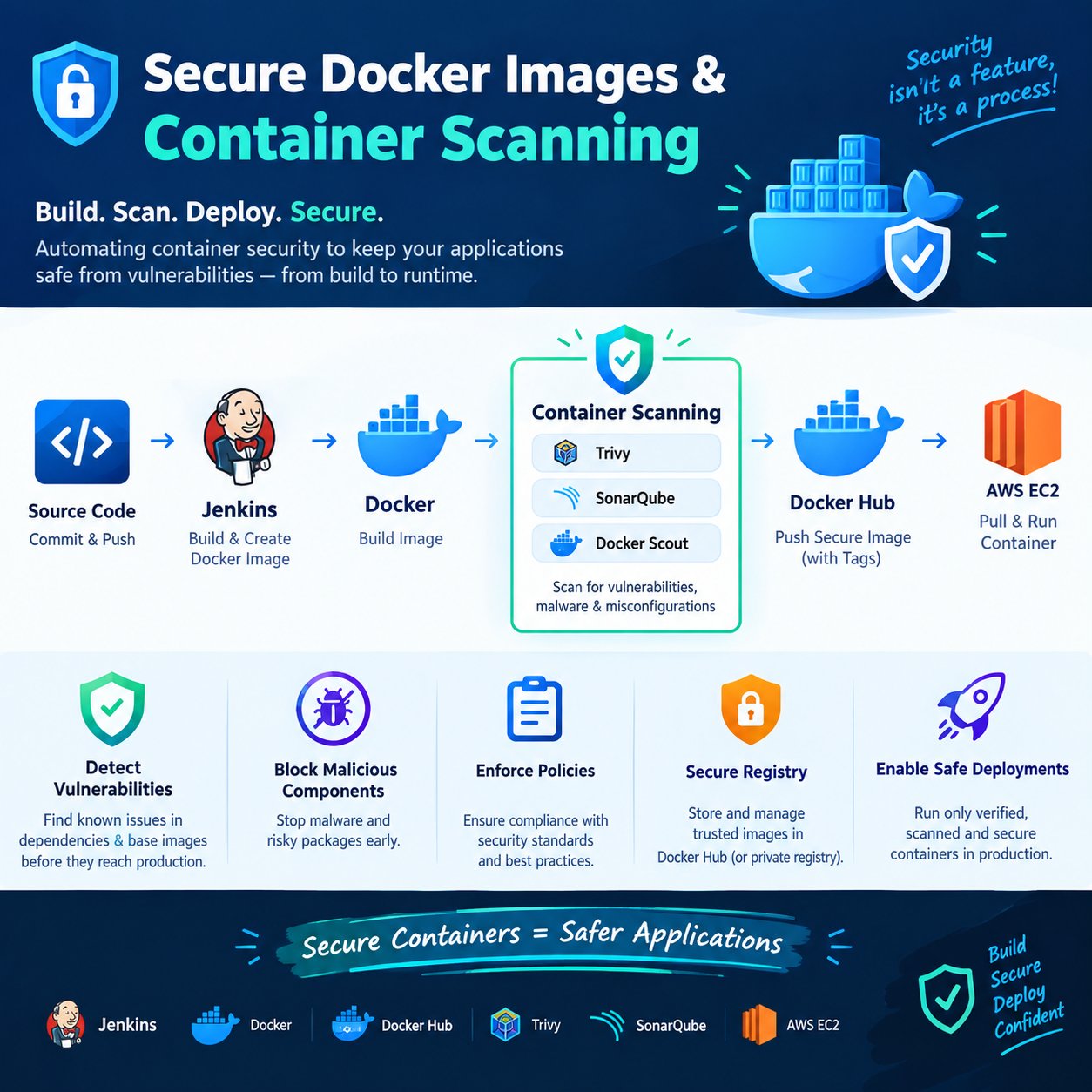
How Container Scanning Works
Types of Image Scanning
Popular Container Scanning Tools
Secure Docker Image Best Practices
Image Hardening Techniques
Multi-Stage Builds and Security
Container Image Signing and Trust
Security Policies in CI/CD
Continuous Security Monitoring
Compliance and Industry Standards
Future of Container Security
Understanding Docker Images
A Docker image is an immutable blueprint used to create containers. Unlike virtual machines, Docker containers share the host operating system kernel, making them significantly lighter and faster.
However, this shared-kernel architecture also means that vulnerabilities inside a container can become serious security concerns if proper isolation and security practices are not followed.
A Docker image usually contains:
Base operating system
Runtime environment
Application dependencies
Application code
Configuration files
Metadata
Every image is built in layers, and each layer contributes to the final image.
Think of a Docker image as a sealed package. Whatever goes into that package—including outdated libraries or exposed secrets—travels with it wherever it's deployed.
Why Container Security Matters
Organizations increasingly deploy thousands of containers across cloud platforms like AWS, Azure, and Kubernetes.
Every container becomes a potential attack surface.
Some common risks include:
Outdated operating system packages
Vulnerable application libraries
Misconfigured permissions
Exposed credentials
Untrusted third-party images
A single vulnerable image can affect hundreds of running containers if reused across multiple services.
This is why modern organizations shift security left—identifying security problems during image creation instead of after deployment.
The Anatomy of a Docker Image
Understanding image structure helps explain why vulnerabilities exist.
A Docker image consists of stacked read-only layers.
Example conceptual flow:
Application Code
───────────────
Application Libraries
───────────────
Language Runtime
───────────────
Operating System Packages
───────────────
Base Image
Each Dockerfile instruction creates another layer.
Examples include:
Installing packages
Copying files
Adding configuration
Installing dependencies
Once built, these layers become immutable.
The benefit is efficiency.
The challenge is that vulnerabilities hidden inside lower layers remain part of every derived image.
What Makes a Docker Image Vulnerable?
A Docker image becomes vulnerable whenever it contains software with known security weaknesses.
These weaknesses may come from:
Operating system packages
Programming language dependencies
Third-party libraries
Misconfigurations
Weak permissions
Importantly, developers often introduce vulnerabilities unintentionally.
For example:
Using outdated base images
Installing unnecessary packages
Leaving debugging tools inside production images
Running applications as root
Many vulnerabilities exist before developers even write their first line of application code.
Types of Container Vulnerabilities
Container vulnerabilities generally fall into several categories.
Operating System Vulnerabilities
These originate from packages installed inside the base image.
Examples include:
OpenSSL
glibc
curl
Bash
If these packages contain known vulnerabilities, every container using them becomes affected.
Application Dependency Vulnerabilities
Modern applications rely heavily on package managers.
Examples:
npm
pip
Maven
Gradle
Composer
A vulnerable dependency automatically increases application risk.
Configuration Vulnerabilities
Examples include:
Exposed ports
Weak permissions
Disabled authentication
Insecure default configurations
These issues often arise from incorrect Dockerfile settings.
Secret Exposure
One of the most common mistakes is embedding secrets directly inside images.
Examples:
API keys
Passwords
AWS credentials
SSH keys
Even if deleted later, secrets may remain inside earlier image layers.
Privilege Escalation Risks
Containers running as the root user provide attackers with more opportunities to escalate privileges.
Least-privilege principles significantly reduce this risk.
Container Supply Chain Security
Container security extends beyond developers.
The software supply chain includes every component involved in creating an image.
Typical chain:
Developer
↓
Git Repository
↓
CI/CD Pipeline
↓
Docker Build
↓
Docker Scanning
|
Image Registry
↓
Deployment Platform
An attacker only needs to compromise one stage.
Supply chain security focuses on protecting:
Source code - sonarqube
Build systems - maven
Dependencies - trivy
Image registries - trivy
Deployment pipelines - ci/cd security
This has become especially important following high-profile software supply chain attacks.
Understanding CVEs and Security Scores
Most scanning tools identify vulnerabilities using CVEs.
CVE stands for Common Vulnerabilities and Exposures.
Each vulnerability receives:
Unique identifier
Severity score
Description
Affected versions
Example format:
CVE-2025-12345
# predefined vulnerabilites
Severity typically follows CVSS scoring.
| Score | Severity |
|---|---|
| 0–3.9 | Low |
| 4–6.9 | Medium |
| 7–8.9 | High |
| 9–10 | Critical / Immediate actions |
Organizations often block deployments containing critical vulnerabilities.
How Container Scanning Works
Container scanning analyzes image contents before deployment.
Rather than executing the application, scanners inspect image layers.
Typical process:
Read image layers
Identify installed packages
Extract package versions
Compare versions against vulnerability databases
Generate a security report
This process is fast because scanners examine metadata rather than running every application function.
Types of Image Scanning
Different scanners focus on different security areas.
OS Package Scanning
Checks operating system packages.
Examples:
Debian packages
Alpine packages
Ubuntu packages
Language Dependency Scanning
Scans programming language packages.
Examples:
Python packages
Java dependencies
Node.js modules
Configuration Scanning
Checks Dockerfiles and image settings.
Examples:
Root user detection
Exposed secrets - .env
Insecure permissions - root package delete
Secret Scanning
Searches for accidentally committed credentials.
Examples:
AWS keys
GitHub tokens
Database passwords
License Scanning
Some enterprise tools also verify software licenses.
This helps organizations avoid legal compliance issues.
Popular Container Scanning Tools
Several scanning tools are widely used across DevSecOps environments.
Docker Scout - PRODUCTION


Docker's native security solution.
Features include:
Vulnerability analysis
Base image recommendations - alpine, node
Security and memory insights
Registry integration - DockerHub
Trivy - self hosted solution


One of the most popular open-source scanners TRIVY
Features:
Docker Image scanning
Local Filesystem scanning
Kubernetes scanning
Secret detection - sensitive information
Grype


Focuses on vulnerability detection.
Strengths:
Fast scanning
SBOM support
Detailed reports
Snyk - High level scanning


Enterprise-focused platform offering:
Dependency scanning
Container scanning
Infrastructure scanning
all capabilites of self hosted zone
Amazon ECR Enhanced Scanning


AWS provides built-in image scanning through Amazon Inspector.
Benefits:
Automatic scanning
Continuous monitoring
Integration with ECR repositories
Secure Docker Image Best Practices
Building secure images begins with design decisions.
Use Official Images
Official images receive regular maintenance.
Examples:
Python
Ubuntu
Alpine
Node
Avoid downloading unknown images from public registries.
Choose Minimal Base Images
Smaller images reduce:
Attack surface
Vulnerabilities
Storage requirements
Examples include:
Alpine
Distroless
Slim variants
Pin Image Versions
Instead of:
python:latest
python:dev
python:prod
python:uat
Prefer version-specific tags.
This improves predictability and security.
Remove Unnecessary Packages
Every installed package increases potential risk.
Only include components required for production.
Run as Non-Root
Avoid running applications with root privileges.
Least privilege significantly limits attacker capabilities.
Image Hardening Techniques
Image hardening means reducing unnecessary exposure.
Important practices include:
Remove Build Tools
Compilers should not remain inside production images.
Delete Package Caches
Package manager caches increase image size unnecessarily.
Disable Interactive Shells
Production containers rarely require interactive shells.
Reduce Writable Locations
Restrict filesystem modifications wherever possible.
Minimize Installed Utilities
Utilities like editors or debugging tools should remain outside production images.
Multi-Stage Builds and Security
Multi-stage builds separate build environments from runtime environments.
Conceptually:
Build Stage
- Compiler
- Source Code
- Build Tools

↓

Runtime Stage
- Compiled Application
- Minimal Runtime
Benefits include:
Smaller images - size reduce
Fewer vulnerabilities - low severity
Reduced attack surface - least software install
Cleaner production environments
This is one of the most effective image optimization techniques.
Container Image Signing and Trust
How can you verify that an image hasn't been modified?
Image signing provides authenticity.
Signed images allow organizations to verify:
Publisher identity
Image integrity
Tamper protection
Common concepts include:
Digital signatures
Trust verification
Supply chain integrity
Image signing becomes increasingly important in enterprise deployments.
Security Policies in CI/CD
Modern pipelines automatically enforce security.
Typical workflow:
Developer
↓
Build Image
↓
Scan Image
↓
Evaluate Policy - > STOP
↓
Push Registry
↓
Deploy
Organizations commonly enforce rules such as:
No critical vulnerabilities
Approved base images only
Image signing required
Secret detection enabled
Automated policies reduce human error.
Continuous Security Monitoring
Security does not end after deployment.
New vulnerabilities appear daily.
An image considered safe today may become vulnerable tomorrow.
Continuous monitoring helps organizations:
Detect newly published CVEs
Rescan existing images
Generate alerts
Prioritize remediation
This is particularly important for long-running containerized applications.
Compliance and Industry Standards
Many industries require secure container practices.
Important standards include:
CIS Docker Benchmark
Provides recommended security configurations for Docker environments.
Examples include:
Secure daemon settings
User permissions
Logging
Networking
NIST Guidelines
NIST recommends:
Least privilege
Secure image management
Continuous vulnerability assessment
Supply chain security
Organizational Policies
Many companies establish internal requirements such as:
Mandatory image scanning
Approved registries only
Image retention policies
Security reviews before deployment
Compliance ensures consistent security across environments.
The Future of Container Security
Container security continues evolving rapidly.
Several emerging technologies are reshaping this space.
Software Bill of Materials (SBOM)
SBOMs provide complete inventories of image contents.
Benefits include:
Dependency visibility
Faster vulnerability identification
Regulatory compliance
AI-Assisted Vulnerability Detection
Machine learning increasingly helps prioritize vulnerabilities based on exploit likelihood.
Runtime Security
Future platforms combine:
Build-time scanning
Deployment policies
Runtime threat detection
This creates end-to-end container protection.
Zero Trust Containers
Zero Trust principles emphasize:
Continuous verification
Identity-based access
Minimal permissions
Secure communication
Container security is gradually moving beyond image scanning into complete workload protection.
Why Secure Docker Images Matter in DevSecOps
Traditional security often occurred after applications were deployed.
DevSecOps changes this philosophy.
Instead of asking:
"Is this container secure?"
Teams ask:
"How do we ensure every image remains secure throughout its entire lifecycle?"
This mindset encourages:
Secure development
Automated validation
Continuous monitoring
Faster remediation
Reduced operational risk
Secure Docker images become the foundation upon which reliable cloud-native applications are built.
Key Takeaways
Docker images are immutable artifacts containing operating systems, dependencies, and application code.
Every image layer can introduce security vulnerabilities.
Common risks include outdated packages, exposed secrets, excessive privileges, and misconfigurations.
Container scanning identifies vulnerabilities before deployment by comparing package versions against vulnerability databases.
CVEs and CVSS scores help prioritize remediation efforts.
Popular scanning solutions include Docker Scout, Trivy, Grype, Snyk, and Amazon ECR Enhanced Scanning.
Secure image practices include using official minimal images, pinning versions, removing unnecessary packages, and avoiding root users.
Multi-stage builds reduce image size and attack surface.
Image signing strengthens supply chain trust.
Continuous monitoring is essential because new vulnerabilities emerge even after deployment.
Security should be integrated throughout the entire container lifecycle, making container scanning a core pillar of modern DevSecOps rather than a one-time compliance activity.


